Apply as a Subcontractor (Add to Existing)
- May 1
- 2 min read
Updated: May 11
'Submission to Existing' or ‘Add to Existing’ is the terminology used for associating a new sub-permit with an existing “Parent” permit. The most common scenario for this is a Trade Subcontractor applying for their own specific permit under the purview of a larger, general Building Permit.
Each jurisdiction is different in their processes, but the following steps will apply to most situations:
Step #1 - Navigate to the MGOconnect Customer Portal (if required)
Go to mgoconnect.org
Choose Customer Portal
Select your state and Jurisdiction
Log in with your credentials
Step #2 - Homepage
Select “Apply Online for a Permit” or similar language that your jurisdiction may have opted for

You may need to select Permit again, as shown below, or you may immediately see the option for either “Get Started on a New Application” or “Submission to an Existing Project”
If you do not see “Submission to an Existing Project”, your jurisdiction may not offer Add-To-Existing permit types. Please contact your jurisdiction’s Permitting Department if you are unsure of their practices.


Step #3 - Select the Permit that Applies to Your Situation
Each jurisdiction will have their own choices within this category, but you will generally be able to find the Permit type you are looking for.
If the Permit type you are looking for does not show, your jurisdiction may not offer that Permit type. Please contact their Permitting Department directly if you have questions.

Step #4 - Locate the Parent Project
You will be prompted to input some information in order to find the original (Parent) Permit Project you intend to link your sub-permit to
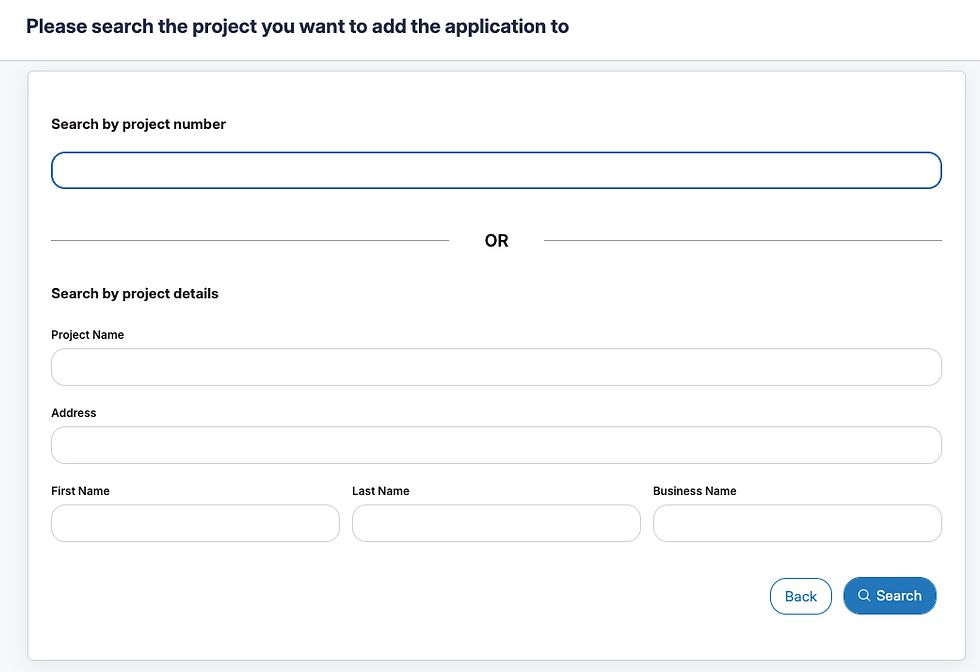
The Parent Project will populate, and give you the ability to “Open” the application to begin the process

Note: Other scenarios “Add to Existing” may apply to include renewing an existing license. If you are renewing an Occupational License, you may see the option for “Submission to an Existing Project”