Code Compliance/Solution Center
- May 4
- 1 min read
Updated: May 11
To report an issue in most Jurisdictions, you must be logged into your account. If you do not have an account see article: Create a New User Account.
Step #1 - Navigate to the MGOconnect Customer Portal (if required)
Some Jurisdictions allow citizens to anonymously report Code Compliance issues and grievances.
Go to mgoconnect.org
Choose Customer Portal
Select your state and Jurisdiction
Log in with your credentials (if required)
Step #2 - Navigate to the Solution Center
If your Jurisdiction handles Solution Center or Code Compliance issues on the MGOconnect Customer Portal, an option such as "Report an Issue" will be available on the homepage.
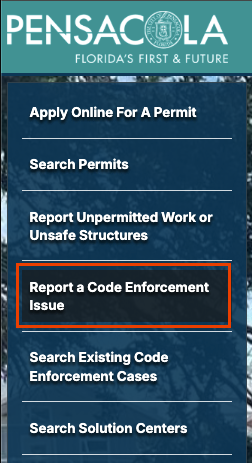
Step #3 - Solution Center
Select Solution Center

Or a specific Request Type, if your Jurisdiction lists options to choose from

Step #4 - Complete the Request Form
A request form will then be available to complete, with more details about your concern, it's location, and the nature of the violation.